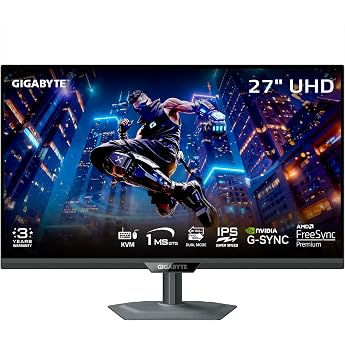
A budget-favorite 4K 144Hz IPS monitor with razor-sharp text, HDMI 2.1 for PS5/Xbox, and a built-in KVM. A go-to for gaming and work; minor knocks are occasional ghosting and a black-screen-on-alt-tab quirk.
What 63 owners say
562 comments reviewed · scored on the 63 clearest verdicts
87%
Recommend
55 owners
13%
Neutral
8 owners
0%
Don't recommend
0 owners
Source
Breakdown
Score
N
✓ Counted in the score
Reddit
87%
63
Reviewed, but not counted — and why
Affiliate blogsiThese blogs earn a commission when you buy. Across our data they rate products ~35 points more positively than actual owners — shown for transparency, never counted in the score.paid commission
50%
2
⚖Affiliate blogs here say 50% recommend, while the owner-based score is 87%. They earn a commission on every sale — so we show them for transparency but never let them move the score.
The headline score reflects owners (Reddit, enthusiast forums), independent lab tests, and blogs with no affiliate links. YouTube and affiliate blogs are shown for perspective but kept out — hover the i for why.
Top quotes, sourced
562 reviewed · 65 shown
Sentiment
Community
Sort
Reddit— neutral
“I own the HDR400 screen(M28U), I honestly prefer the HDR mode to a non HDR. Of course it’s a far fetch from actual real HDR, but I still find that mode more vivid and bright.”
Reddit▲ recommend
“I’ve been using the Gigabyte M28U since PS5 launched and its pretty good for its price right now”
Reddit— neutral
“I currently have the gigabyte m28u it's not great but it's decent for the price but I just can't see anything anymore i literally have to use a magnifying glass in some games”
Reddit▲ recommend
“I also use m28u, it works great with the PS5. KVM allows you to use one pair of headphones keyboard/mouse on multiple devices (PC, PS5)”
Reddit▲ recommend
“Got a m28U monitor and keeps up with most things (ignoring RT. which doesn't bother me in the slightest).”
Reddit— neutral
“Using a Gigabyte M28U right now for more than a year and it's alright. Got issues with HDR and overall brightness but it got solved eventually. I just don't use its HDR capabilities at all because it isn't real HDR anyway.”
Reddit▲ recommend
“I've had the M28U for a couple of years now and it is rock solid. (144hz, IPS).”
Reddit— neutral
“My gigabyte m28u has been very nice for my series x. The hdr is complete ass but for gaming it's pretty terrific to run 120hz at 4k.”
Reddit— neutral
“Was debating between this one and the Gigabyte m28u, but ultimately I went with Innocn because it had more dimming zones”
Reddit▲ recommend
“I've been using the Gigabyte M28U for a few years and really enjoy it.”
“I really regret getting a 4K monitor (it’s an IPS - m28u). It’s just too expensive .”
Reddit— neutral
“Gigabyte M28U. I know, it's not the best but it works for me.”
Reddit▲ recommend
“I have a 4080 and Play at 4k 144hz. Monitor is gigabyte m28u. No regrets at all. Nothing beats 4k in terms of image quality. Text is super sharp, jaggies are a thing of the past.”
Reddit— neutral
“I have a Gigabyte M28U and 4k via HDMI only works at 60Hz.”
Reddit▲ recommend
“this is the gigabyte M28U and I've had it for over 2 years now and it's fantastic. I only game on PS5 with it. (excuse the low quality iPhone 6 image) I highly recommend it, it's great”
Reddit▲ recommend
“I picked up a Gigabyte M28U a few years ago that was pretty cheap at the time. I don't know how cheap 4K 100+hz monitors have gotten since then, but I've got no complaints with this one.”
DisplayNinja (affiliate)— neutral
“The Gigabyte M28U is a decent 4K gaming monitor, but there are better options in this price range.”
Reddit▲ recommend
“I am using the gigabyte m28u monitor and it's just lovely. It does 144hz using the hdmi 2.1 connection. Also does 3840x2160. It looks better than the MacBook screen and that's hard to do.”
Reddit▲ recommend
“For a great deal, I've owned Gigabyte M28U for two years. It has KVM included. Cost around usd 450 only. 4K 144 Hz, hdmi2.1 , dp. Split screen for dual input or pip.”
Reddit▲ recommend
“Ich habe den Gigabyte M28U und bin sehr zufrieden. Der Bildschirm hat einen eingebauten KVM Switch der das wechseln zwischen Arbeitslaptop und Privat PC erleichtert da ich nichts umstecken muss.”
Reddit▲ recommend
“I've been using an M28U (27 inch 4k 144hz) for years now, and while it is a pretty cheap monitor, the clarity of text and other stuff is unbelievable. It's a wonderful thing, and at the perfect size.”
Reddit▲ recommend
“I recently upgraded from 1080p to the Gigabyte M28U. I use it for both programming and gaming and have found the sharpness and refresh rate to be very good!”
Reddit▲ recommend
“I have a 28" 4K Gigabyte M28U and two AOC 1440p monitors - one is 27" and one is 24". Anyone would be able to tell which one was 4K straight away.”